Category: Technical SEO

  • Google and Page Speed

    Google has had Page Speed at the top of everyone’s list. As a result, companies and agencies alike have bent over backward to try to improve the page speed on their websites. How much does page speed really matter?

    Page Speed Measurement Compared to Experience

    In Google Search Console(GSC), there is a section called “Experience.” It is a simplification of the user experience boiled down into technical performance metrics. At a high level, it is as basic as “Good”, “Needs Improvement,” or “Poor.” Then, you click into the individual core web vital metrics to find the issues for specific URLs. Here are some of the metrics you’ll see.

    What is interesting is that the experience you have navigating the website might not reflect what the Core Web Vitals pick up. You may feel like the page loads appropriately, while the FCP for Google Search Console tells you the page is slow. We see pages where Google is showing a 3-second load, but we can’t even count 1-mississippi before the page loads. What’s up with that, and how much should you worry about it?

    First, always look to improve consumer experience. Use GSC to highlight possible issues. If these align with your experience, then address them right away. If not, then look beyond GSC to identify areas for improvement. Look at things like bounce rate, unexplained high exit rates on pages, or changes in user flow that don’t make sense. Your priority should be user experience, then Google Search Console speed warnings.

    Second, put GSC in perspective. Google has (I suppose) done a good job at measuring technical aspects of a website. But, these do not always translate into issues for users. The page speed issue is chief among these. Google is measuring what it’s code is determining as a meaningful page load, but the user experience can start properly before all the code is loaded. So, if you’re going for improved User Experience, then prioritize that over technical metrics from Google.

    Technical Speed Issues

    If you’ve addressed the issues directly impacting user experience, then turn back to GSC and start picking away at the technical issues highlighted in the Experience section. The trick is to prioritize the issues highlighted by Google and your available resources.

    Look for metrics that are way out of line with what GSC views as good, even if your own experience shows it to be okay. Can these be addressed by re-ordering code (blocking js), adding some tools, or reducing the overall page load?

    You may be a few short steps from big improvements in Google’s eyes. See if you can address them.

    But here is the thing: If you are running into issues you really can’t address, chances are, you are not alone.

    Google seems to have the Eutopian view of the web that is out of step with the vast majority of the sites that make up the web. What this means is that we are all graded on some type of curve, not an absolute scale. So, if you address the real User Experience issues first, then fight through what you can of the GSC warnings, there’s a good chance you are already, technically, ahead of most websites.

    While Google’s objective is laudable, its methods are too steeped in a reliance on technology to measure human experience. I’ve been on enough calls with people to accept that they are sincere in their belief that their tools and AI are superior methods to measure user experience. But, the reality we see would suggest that the tools are not quite as good as they believe them to be.

  • Is your SEO Agency Asleep On The Job

    Is your SEO Agency Asleep On The Job

    Veterans of the SEO industry have seen a lot. When we take over an account, we always see things that we would do that the prior SEO agency didn’t do. In all likelihood, when we lose an account, the new agency will say the same about our work.

    It is normal for agencies to take different approaches to SEO. Thus, it’s not really fair to say that someone wasn’t doing their job just because they do it differently. And sometimes it takes a new perspective to help give a site a boost, tackling the problem from a different angle. Again, this is normal in SEO work.

    But, what if it is simply a case of the SEO agency (or employee) not doing their job? This is much different than just having a different approach. It is just not doing it.

    The challenge for clients is that they may not know enough about search engine optimization to know that basic things, housekeeping items, are not getting done.

    Are there some things you can check to see? Yes.

    Get written content change recommendations

    When you trust an SEO partner, it can be easy to say “just go ahead and do it.” And that’s fine. We have many clients that trust our knowledge of their industry and allow us free reign on content edits. But, your agency should provide a document that shows the before and after of content changes.  When you browse your website, you should be able to see those changes.

    It is possible that the content is well optimized and does not require changes. That’s fine also. Don’t make changes just to see changes. But, there should be some dynamic components to your content. If not changes, then new content.

    Check the H tags

    This may be a bit hard for some to do, but once you get the hang of it, it isn’t too difficult. The H tags are html code that helps search engines understand the content structure of your page. There should only be one H1 tag, and a page can have multiple H2 tags, as well as possibly some H3, H4 tags (and so on). 

    Where we see an issue is when there are no H tags, or there is only an H1 tag. This single H1 tag is usually derived from the site template and is not really added with much consideration.

    To see the H tags, go to a page on your site using chrome (it’s easiest since it’s the most used browser). Then hover on the page and right-click on your mouse. You should see “Page Source” as an option. Click this to open a new tab that has the code. Don’t sweat it, you don’t need to read or understand this.

    On the upper right of the browser, click on the three vertical dots, then select “Find.”  Then, enter “<h1” (I left out the closing bracket intentionally. The actual tag should look like <h1>, but some may put in a space). There should be only one. Click the down arrow to go to the instance of the “<h1”. Does the content next to the tag make sense? Does it describe the main theme/topic of the page? If not, you may need to ask your agency about it.

    Now search for “<h2.” Are there any instances? If so, click the down arrow in the search to go to the first instance, and then the next, and so on. Do these make sense, are they relevant to the content on the page? If so, great. If not, again, ask your agency about them.

    Google Search Console

    Google Search Console (GSC) is a great tool. Among other things, it will tell you the pages that have issues. Ask your agency to download the issues report for you if you don’t have access. 

    When you get it, you will likely see issues. Some of Google’s ‘issues’ can’t always be resolved. But, your agency should be able to explain to you what they have done and why the pages still on the list can’t be fixed.

    These three things will help you understand if your SEO agency is paying attention to your program. No agency is perfect and you may very well find some issues. But, no explanation for the various items above should raise some flags.

  • What are the most common Google Search Console issues with Mobile SEO?

    What are the most common Google Search Console issues with Mobile SEO?

    We’ve seen this across sites… error after error resulting in websites being flagged as “not mobile-friendly”. This becomes frustrating for some website owners because Google is often not specific about where the problem is on the page. But, before we get into the actual issues, you have to ask, is it worth my time to fix?

    Why you need to fix mobile site issues

    Should you care about the mobile site issues? ABSOLUTELY! There are multiple reasons to be concerned. But the biggest is it can kill your organic site traffic.

    Google has switch most sites to Mobile First Indexing. So, however your mobile site is assest will impact the organic results of your desktop version as well. Since getting mobile right is harder than desktop, a bad mobile experience will sink your SEO ship.

    And, it will get even worse. Google search is moving to Core Web Vital roll out. When this happens, your mobile experience will have even more impact on your overall SERPS, and it will be harder to acheive good marks on your mobile score.

    For now, the good news is your site isn’t the only one that sucks. This is part of the reason most sites haven’t tanked yet. But, as site owners start addressing the mobile issues, they will have the advantage, and take the top SERPS.

    So, don’t wait to address the mobile issues. If your one of the first, you’ll gain an advantage.

    What are the most common mobile site issues?

    There are a lot of elements Google will use to judge your website. And the prioritization of the elements will likely change over time… without any warning from Google. For now, here are the issues we see most.

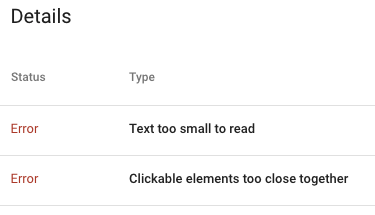
    Text On Page Too Small

    Virtually every site not developed in the past year gets this warning, and most recent sites do to. This is a tricky errror to pinpoint.

    The general guidline is that text on the page should be 16px or larger. If your CSS font size is always set as px, then the fix is pretty easy. Just find the font-size in the css and change anything less than 16px to 16px. Or is it that easy?

    Two issues arise with this.

    First, CSS font-size can, and often (should be) set with a relative measure (em for example). This was a cornerstone in responsive design. As the screen size shrinks, so does the font size. On mobile, this means it can be the equivalent of less than 16px. But, you won’t see that in the CSS. You have to use the inspect tool on Chrome and look at the rendered size.

    Second, even if you can go through your CSS and change the font-size to 16px or larger, are you sure it will play well with the design? There is a reason designers made fonts the size they did. If you just push up the size of some copy, then you impact the layout and proportions of the page. Does this still work?

    Clickable elements too close together

    We see clickable elements too close together most often on menus, but it can happen anywhere. Google wants there to be 48px of clickable area. The motivation is to improve accessibility for users.

    The most common fix for this is to add padding to the elements to expand them to the minimum size.

    The fix for this issue also has implications for design and rendering. The sites were originally created to look a certain way, and if we’re honest, designers rarely thought about clickable area. Simply adding padding to clickable areas may be an easy technical fix and put you in good position for Google, it may create a problm on your site.

    When looking at the scope of fixes need to meet Google’s Core Web Vitals, and the mobile test, you may find simple fixes are so simple. But, start with a staging area and make an initial round of changes. If the site rendering is acceptable, you can move forward. If not, you may need to reengage a design/front end developer to address the site design issues.